
The first cloud repatriation project usually starts because something feels off.
Maybe a workload that once needed flexibility now runs at the same level every day. Maybe the bill keeps climbing. Maybe performance is inconsistent. Maybe compliance got more complicated. These are some of the same reasons why enterprises are repatriating cloud workloads in the first place.
But the more interesting part usually comes after the move.
Now the team knows what the migration actually took. They know what the application costs to run somewhere else. They know which dependencies were a pain, which network connections mattered more than expected, and how much infrastructure they really want to manage themselves.
What do enterprises learn after their first cloud repatriation project?
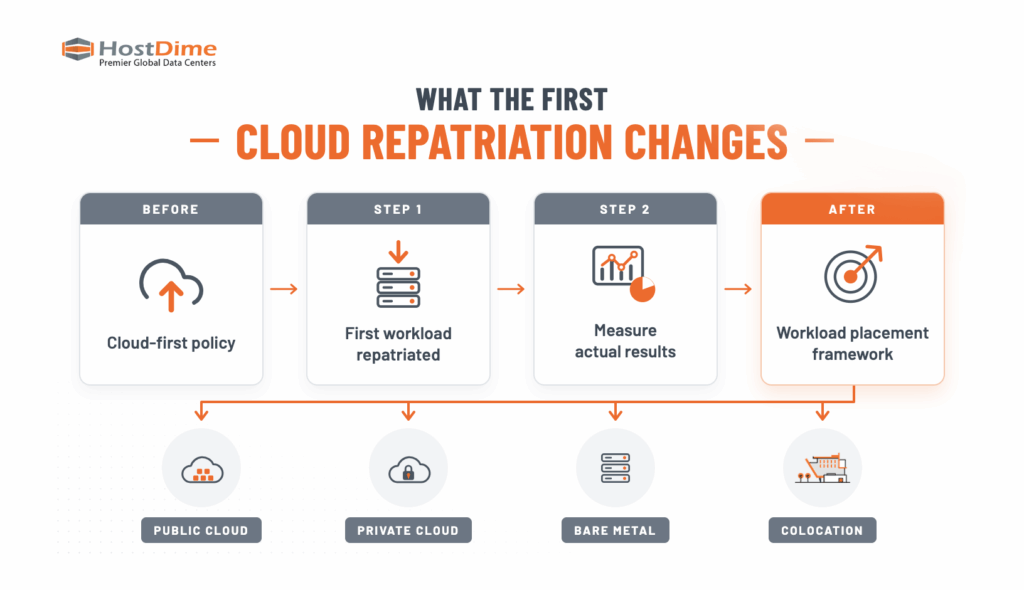
Mostly, they learn to stop treating infrastructure like a company-wide philosophy and start looking at workloads one at a time. Some belong in public cloud. Some make more sense on private cloud or bare metal. Some fit naturally in colocation. And plenty of enterprises are going to end up using all of them.
How Cloud Repatriation Changes Workload Placement
After the first repatriation, infrastructure conversations usually become more specific.
A customer-facing application with unpredictable traffic spikes may still be a great fit for public cloud. A database that runs hard all day, every day, may look much better on dedicated hardware. A latency-sensitive application may simply need to live closer to its users or data.
So instead of asking, “Should we use the cloud?” the better question becomes: “Where does this workload actually make the most sense?” That is a more useful way to think about infrastructure.
What Does Cloud Repatriation Really Cost?
One of the first lessons is that comparing a cloud bill to the price of a server does not tell you very much.
Public cloud costs can pile up across compute, storage, backups, managed services, bandwidth, licensing, support, and data transfer.
Dedicated infrastructure has its own pile. Hardware, power, rack space, bandwidth, networking, management, software, and eventually replacing the equipment. That makes understanding dedicated infrastructure vs. cloud cost at scale especially important when a workload has reached steady, predictable usage.
Then there is the move itself. Data egress, engineering time, testing, temporary parallel environments, and application changes can all affect the payback period.
The more useful question becomes: What does it cost us to operate this workload over time?
Once a company has completed one repatriation project, that answer gets easier because it has something better than a spreadsheet full of assumptions: its own data.
Which Workloads Are Best Suited for Cloud Repatriation?
A lot of good repatriation candidates have one thing in common: they have become predictable.
Predictability matters because public cloud provides significant value when demand changes quickly. Capacity can expand during traffic spikes and contract when demand falls.
Mature applications often behave differently.
A database stays busy around the clock. A production platform uses about the same amount of compute every day. A large data set keeps growing, but it is not suddenly asking for five times more processing power on a random Tuesday afternoon.
When that happens, it becomes worth looking at how cloud and bare metal costs change as workloads stabilize.
That does not automatically mean the workload should leave public cloud. It means the enterprise has enough information to model alternatives accurately.
The first repatriation makes that process easier because the team now understands the real migration effort, staffing requirements, and operating costs involved.
What Makes Cloud Repatriation Difficult?
Application dependencies are often harder to move than the compute itself.
Applications rarely live alone. They talk to databases. Storage. Monitoring tools. Backups. APIs. Other applications. Cloud-native services someone wired in three years ago that nobody thinks about anymore because they just work.
Move one thing and suddenly you need to figure out what stays, what goes with it, and how everything keeps talking afterward.
That is why dependency mapping matters early in the project. It is also why repatriation often leads to a modern hybrid infrastructure stack instead of everything ending up in one neat little box.
The main workload might move onto dedicated infrastructure while some supporting services stay in public cloud, which is fine. The goal is not to clear out the cloud; the goal is to put each part of the application somewhere that makes sense.
Why Networking Matters After Cloud Repatriation
Networking gets a lot more interesting once workloads start living in different places.
An application might move off public cloud and still need to talk to cloud databases, users in another region, backup infrastructure, corporate offices, or another data center.
The quality of those connections affects latency, reliability, and data transfer costs.
Enterprises therefore need to evaluate factors such as carrier availability, routing diversity, Internet Exchanges, and private fiber and cross connects between cloud and private infrastructure.
A workload can have attractive compute economics and still perform poorly if its most important systems are several network hops away.
The first repatriation project tends to make that lesson very obvious, very quickly.
Who Manages the Infrastructure After Repatriation?
Moving a workload off public cloud also changes operational responsibility.
Hardware needs lifecycle planning. Capacity needs to be forecast. Backups and disaster recovery need testing. Networking, monitoring, security, and operating systems still require ownership.
Enterprises have several ways to divide that responsibility. They can own hardware and colocate it. They can use dedicated bare metal or Hardware-as-a-Service to avoid purchasing equipment upfront. They can build private cloud environments or use managed services for portions of the stack they do not want to operate internally.
For organizations considering colocation, understanding what actually drives colocation pricing can also help reveal which costs and operational responsibilities move to the data center provider and which remain with the enterprise.
What Should Enterprises Do After Their First Repatriation?
The most valuable next step is to turn the results into a repeatable workload placement framework.
| Before | After |
|---|---|
| Compare cloud bills with hardware cost | Compare full workload economics |
| Apply a broad cloud policy | Evaluate workloads individually |
| Focus mostly on compute | Include network and data movement |
| Estimate migration complexity | Use experience from a real migration |
| Choose a platform | Build a placement framework |
The next workload can then be judged against a few pretty practical questions.
How predictable is it? How much data does it move? What does it depend on? How sensitive is it to latency? How quickly is it growing? Who needs to manage it?
Some workloads will stay exactly where they are. Others will start looking like obvious candidates for private cloud, bare metal, or colocation.
Where HostDime Fits Into a Cloud Repatriation Strategy
Cloud repatriation can lead to several different infrastructure models.
Some companies already own hardware and want colocation. Others want dedicated servers without making a big upfront purchase. Some want private cloud alongside public cloud. Others want help managing the environment after it moves.
HostDime supports these approaches through colocation, bare metal and Hardware-as-a-Service, private and hybrid cloud infrastructure, managed services, and carrier-neutral interconnection.
That flexibility matters because the right answer can change from workload to workload.
The first cloud repatriation project usually makes that clearer than any strategy deck ever could.
You learn what the move really costs. You learn what was harder than expected. You learn what mattered more than you thought it would. And you get a much better sense of where the next workload should go.
If your organization is evaluating a workload for repatriation, HostDime can help assess its infrastructure, connectivity, capacity, location, and management requirements and design an environment around what the application actually needs.